Radar system is an object detection project that uses an ultrasonic sensor and a servo motor to scan the surrounding area. The ultrasonic sensor is mounted on the rotating servo motor, allowing it to scan from 0° to 180° and measure the distance of objects at different angles. The Arduino continuously processes the distance readings from the sensor. When an object is detected within a specified range, the LED immediately turns on and the buzzer produces repeated beeping sounds to provide an alert. This project demonstrates the practical use of ultrasonic sensing, distance measurement, servo motor control, and object detection, making it a useful beginner-level robotics and automation project.
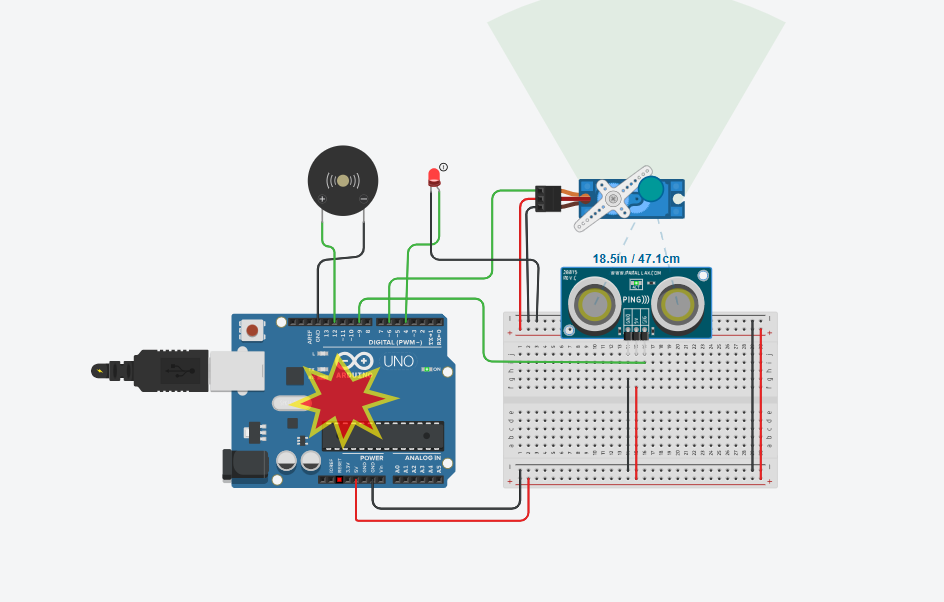
Circuit diagram of Arduino Based Radar system to Detect an object
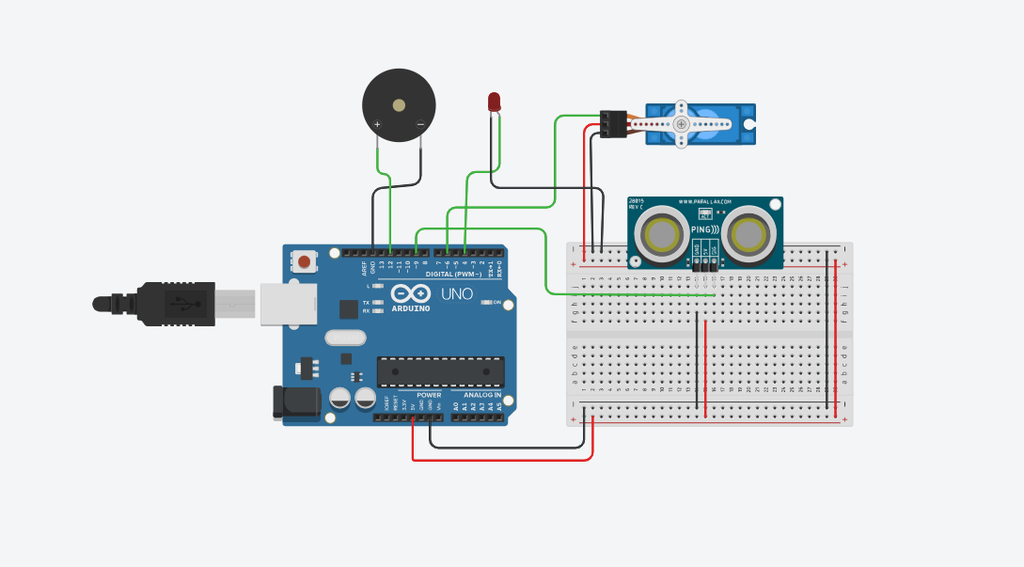
Components used in Radar system
There are following components which are used in creating a Radar system.
Arduino Uno
The Arduino Uno is the main controller of the radar system. It receives distance information from the ultrasonic sensor, controls the movement of the servo motor, and operates the LED and buzzer when an object is detected. The Arduino continuously scans the area by rotating the sensor and processing the measured distance.
Ultrasonic Sensor
The ultrasonic sensor is used to detect objects and measure their distance. It sends ultrasonic sound waves toward an object and receives the reflected signal. The Arduino calculates the distance based on the time taken for the signal to return. In this project, the sensor is used to identify objects within a specified detection range.
Servo motor
The servo motor is responsible for rotating the ultrasonic sensor from 0° to 180°. This movement allows the sensor to scan objects at different angles instead of detecting objects in only one direction. The servo motor therefore creates the scanning action of the radar system.
LED
The LED acts as a visual indicator in the project. When the ultrasonic sensor detects an object within the specified distance, the Arduino turns on the LED to provide an immediate visual alert.
Buzzer
The buzzer provides an audible alert when an object is detected. When the measured distance is less than or equal to the specified detection range, the Arduino activates the buzzer, causing it to beep repeatedly and alert the user.
Bread Board
A breadboard is used to connect and organize the electronic components without soldering. It makes the circuit easier to assemble, modify, and test during the development of the project.
Practical Demonstration of Radar System