Smart Home Automation System Using Arduino: Temperature Monitoring and Automatic Door Control
The Smart Room Automation System Using Arduino is designed to monitor the room temperature and automatically control a door according to the detected temperature. In this project, a DS18B20 temperature sensor continuously measures the surrounding temperature and sends the digital data to the Arduino Uno.
Read More
The Arduino processes this information and displays the current temperature and door status on a 16×2 LCD. When the temperature reaches or exceeds 45°C, the Arduino activates a servo motor, which rotates to 90 degrees to represent the opening of the door, while the LCD displays “Door Open” along with the temperature reading. When the temperature is below 45°C, the servo returns to 0 degrees, keeping the door closed, and the LCD displays “Door Closed.” This project demonstrates the practical use of temperature sensing, digital monitoring, LCD interfacing, and automatic control in a simple room automation system.

Components used in Room Automation system
There are following component used Home Automation system.(Visit )
Arduino board
The Arduino Uno is the main controller of the project. It receives temperature data from the DS18B20 sensor, processes the information according to the programmed condition, controls the servo motor, and sends information to the 16×2 LCD. When the temperature reaches 45°C or above, the Arduino commands the servo motor to rotate to 90 degrees. When the temperature falls below 45°C, it returns the servo to 0 degrees.
Arduino Projects.
16×2 LCD
The 16×2 LCD is used to display the temperature and the current status of the door. It contains 16 columns and 2 rows, allowing information to be displayed clearly. When the temperature reaches or exceeds 45°C, the LCD displays “Door Open” along with the temperature reading. When the temperature is below 45°C, it displays “Door Closed” and the current temperature.
DS18B20 temperature sensor
The DS18B20 is a digital temperature sensor used to measure the temperature of the surrounding environment. It communicates with the Arduino through the 1-Wire communication protocol, using a single data pin. In this project, the sensor continuously provides temperature readings to the Arduino. The measured temperature is then compared with the programmed limit of 45°C to determine whether the door should open or remain closed.
Servo Motor
The servo motor is used to represent the automatic movement of the door. Unlike a normal DC motor, a servo motor can rotate to a specific angular position. In this project, the Arduino controls the servo according to the temperature. At temperatures below 45°C, the servo remains at 0 degrees, representing a closed door. When the temperature reaches 45°C or higher, the servo rotates to 90 degrees, representing an open door.
Working of Room automation system using Arduino

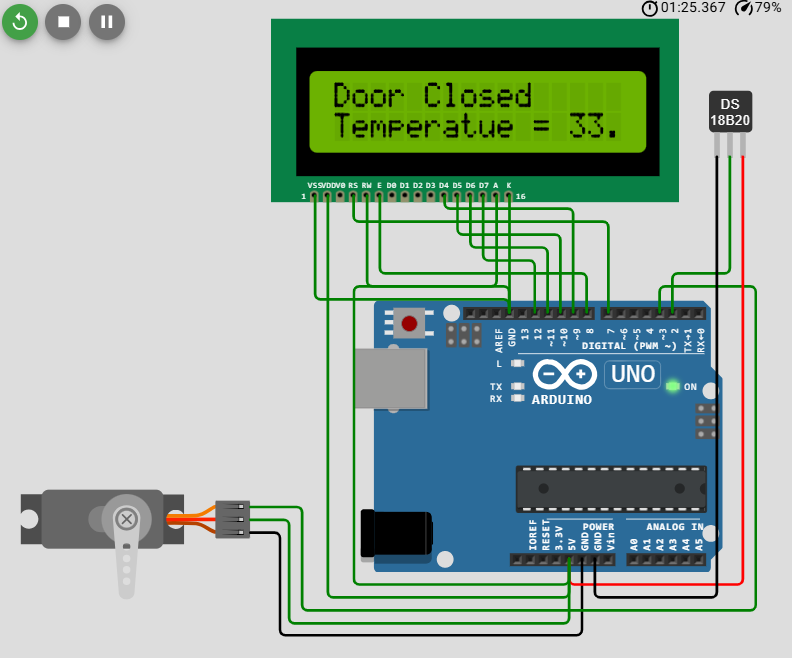
Pin Connection of Arduino, Servo Motor and Temperature Sensor in Temperature monitering System.
| Servo Motor | DS18B20 Temperature Sensor | LCD 16×2 | Arduino UNO |
|---|---|---|---|
| V+ | V+ | VDD | +5 V |
| Gnd | GND | VSS | GND |
| PWM | 3 | ||
| DQ | 2 | ||
| RS | 7 | ||
| E | 8 | ||
| RW | GND | ||
| D0 — D3 | Not Connected | ||
| D4 | 9 | ||
| D5 | 10 | ||
| D6 | 11 | ||
| D7 | 12 | ||
| A | +5 V | ||
| K | GND |